Showing posts with label Cloud PBX. Show all posts

Tuesday, February 27, 2018

Office 365 Phone System numbers, how to convert from User to Service?

When porting numbers to Office 365 Phone System, the admin has to specify if the number should be a service number or a user number. The same applies when new numbers are requested. What’s the difference between the two number types, you may ask. The answer is easy.

A user number is assigned to a single user.

A service number is connected to a call queue, a conference bridge or an auto attendant and is capable of handling simultaneous calls.

A common issue for new Office 365 Phone System customers is where they port an entire number block as user numbers, including the organization’s main number. Soon they discover that the main number should’ve been used with a Call Queue or an Auto Attendant but those features require a the number to be configured as a service number instead.image

If you’re searching for information on how to convert the number type you’ll find many outdated articles stating that this is not possible, requires opening a support incident or recommend to port the number away from Microsoft and then port it back.

The situation has now, end of February 2018, much improved. All you have to do is send an email to Microsoft’s Skype for Business Number Porting Team. They need the following information to be able to process the request:

  • The number that needs to be converted
  • The requested number type: user or service
  • When do you want the conversion to take place?

My experience with a number that’s currently not assigned, so no downtime to communicate with the end users, is that it was converted within 30 minutes after confirming the details through email.

To start the process, simply send an email with the required information to ptn@microsoft.com for North America or ptneu@microsoft.com for Europe.

Please let me know in the comments if you’re experience was as smooth as mine.

Friday, February 23, 2018

Disable voicemail on a Skype meeting room accounts

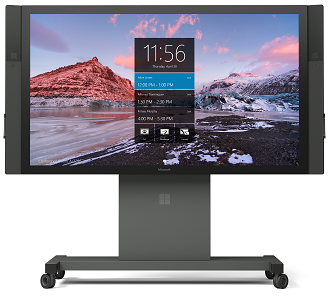
image of a Surface Hub

If you ever had to create user accounts for modern meeting room devices such as Microsoft’s Surface Hub or 3rd party devices such as the Polycom Trio 8800 you may have noticed that process is basically the same. Create a Room Mailbox with an enabled account and a password, then enable the account for Skype for Business with the Enable-CsMeetingRoom cmdlet.

Recently a coworker transferred a Skype call to a meeting room and when the person in the room wasn’t quick enough to respond, the call ended up in the conference room voicemail box. Understandably she requested us to disable voicemail on this account.

After investigation we found that Azure Voicemail was enabled when we added licenses for Office 365 Phone System and Calling Plan. Disabling voicemail is easy. Either sign-in with the username and password of the meeting room and visit the web based advanced settings: https://aka.ms/vmsettings. Then clear the checkbox for Activate Voicemail.

image

Alternatively an admin can disable the voicemail feature in Skype for Business Online PowerShell:

Set-CsMeetingRoom <SIP address> -HostedVoiceMail:$false

Reference:

Check Skype for Business voicemail and options

How to Set up and configure Cloud Voicemail for Skype for Business Online users

Monday, January 16, 2017

Microsoft about to release new Skype for Business IP Phone firmware for Polycom VVX devices

LCS/OCS/Lync/Skype has a long history when it comes to management of IP phone firmware updates. OCS 2007 R2 introduced the Device Update Service and greatly simplified the process and the required infrastructure. In the Lync 2010 timeframe the 3rd party IP phone (3PIP) certification added support for non-Microsoft firmware such as Polycom UC Software.

image

In Lync Server 2010 for instance, an admin uses the Import-CsDeviceUpdate cmdlet to import a .cab file and approves the update in the LSCP. The client device will periodically query the Device Update Web service and download and install the new firmware.

The same principle applies to Skype for Business Online with Cloud PBX today. Technically speaking the title of this article is incorrect, Microsoft is not releasing the software but merely distributing the Polycom firmware through it’s infrastructure.

Enabling or disabling this feature is a tenant-wide setting and can be done by modifying the CsIPPhonePolicy. By default EnableDeviceUpdate is True.

image

For more information about this feature, read Jeff Schertz’s post about this topic: Device Updates with Skype for Business Online.

The major difference with Skype for Business on-premises is that customers cannot upload a firmware version. Microsoft has an internal process to certify 3rd party firmware updates. At the moment of writing the only version that has been approved is Polycom UCS for the VVX line of devices, version 5.4.1.17653. Specifically the following devices are supported:

  • VVX 201
  • VVX 3xx
  • VVX 44xx
  • VVX 5xx
  • VVX 6xx

The issue is that the most recent version of Polycom UCS is currently 5.5.1. That doesn’t sound much newer than 5.4.1 but in reality Polycom has released many interim versions and each version added important new features and fixes. That’s why it’s good to know that Microsoft is currently qualifying UCS version 5.5.1.11344.

If you consider using Skype for Business Online device updates, be aware that the capabilities currently are extremely limited. The device update feature cannot be enabled for a specific set of users or devices and the other management features are limited as well:

image

(note: EnableBetterTogetherOverEthernet by default is False)

Most of the configuration items are pretty self-explanatory but if you want to know more, the help page of  Set-CsIPPhonePolicy is very informative.

Microsoft did not communicate a release date for 5.5.1.11344 but my sources say that it shouldn’t take long. For more information, read: New features in the firmware update for Polycom VVX IP phones.

Note

I’m working with Polycom and Microsoft to investigate an issue where Polycom VVX devices receive a ‘400 bad request’ when they query the Skype for Business Online Update Service. If you’re encountering the same, let me know in the comments.